Networking Reverse Proxy Nginx
Reverse Proxy Architecture & TLS Termination
Detailed technical guide to the internal Nginx reverse proxy architecture, domain routing mechanics, and security header enforcement.
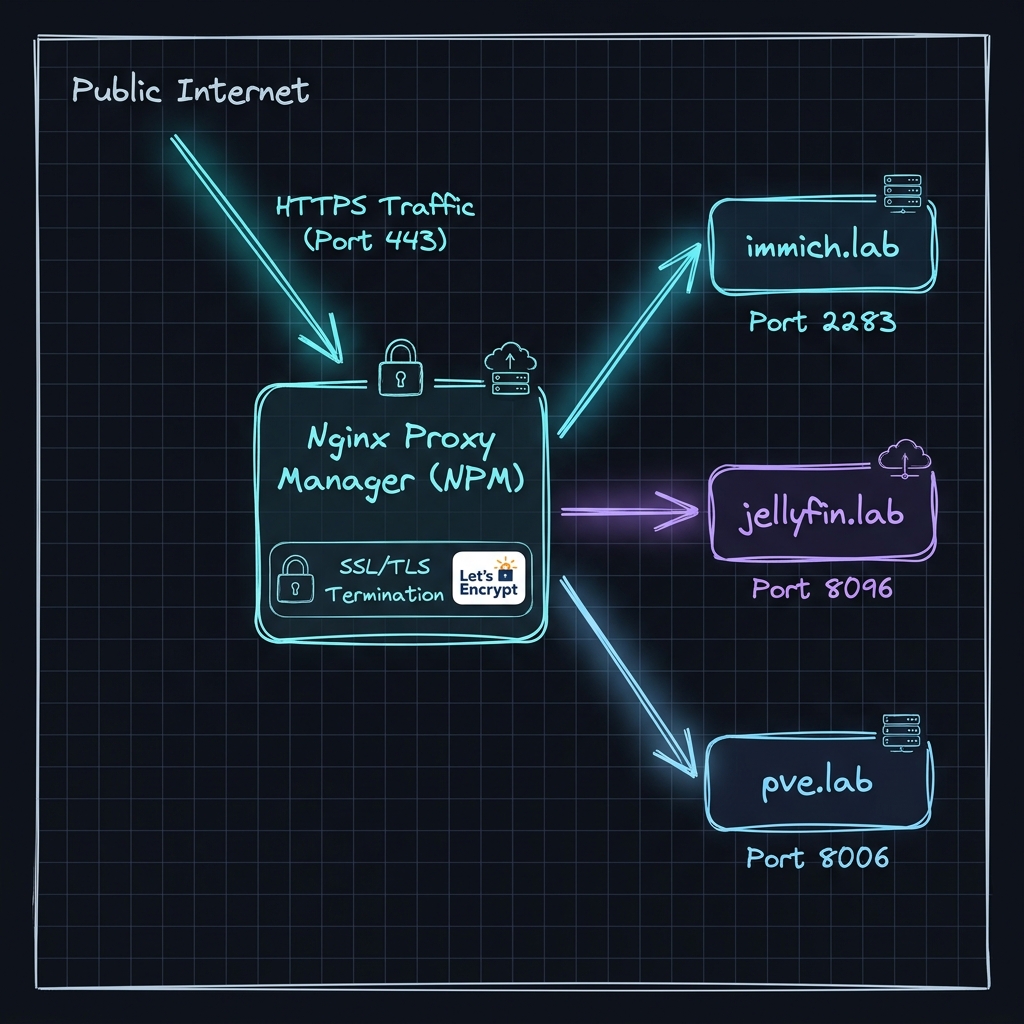
Reverse Proxy Architecture Visual Diagram
Core Problem & Reverse Proxy Solution
1. The Challenge: Single IP & Port Conflicts
In a self-hosted environment, multiple web services (Immich, Jellyfin, Proxmox VE, Grafana) run on different internal container ports (2283, 8096, 8006, 3000). Forcing users to remember IP-and-port combinations (100.64.0.10:8096) leads to poor usability, lacks automatic TLS encryption, and creates security overhead.
2. The Solution: Nginx Proxy Manager Ingress
Nginx Proxy Manager acts as a centralized HTTP/HTTPS reverse proxy that:
- Listens on standard HTTPS port 443 bound to the private Tailscale interface (100.64.0.10).
- Inspects the incoming Server Name Indication (SNI) host header (e.g., immich.lab).
- Terminates SSL/TLS encryption centrally.
- Proxy-passes the unencrypted or internal HTTP request to the designated container target (172.18.0.5:2283).
Technical Features & Security Benefits
A. Centralized Let's Encrypt TLS Management
- Automated Issuance: Obtains SSL/TLS certificates automatically via Let's Encrypt.
- Cloudflare DNS-01 Challenge: Certificates are issued using DNS API validation, allowing Let's Encrypt to verify domain ownership without requiring open inbound ports 80 or 443 on public routers.
B. Header Injection & WebSockets Support
Nginx injects necessary proxy headers to inform backend containers of the real client IP and protocol:
# Core Reverse Proxy Headers
proxy_set_header Host $host;
proxy_set_header X-Real-IP $remote_addr;
proxy_set_header X-Forwarded-For $proxy_add_x_forwarded_for;
proxy_set_header X-Forwarded-Proto $scheme;

# WebSocket Proxy Pass Setup (Immich / Jellyfin Sync)
proxy_set_header Upgrade $http_upgrade;
proxy_set_header Connection "upgrade";
proxy_http_version 1.1;
C. Security Hardening Policies
- Strict Transport Security (HSTS): Forces all client browsers to use HTTPS for subsequent requests (
max-age=31536000). - X-Frame-Options (SAMEORIGIN): Protects web applications against clickjacking attacks.
- X-Content-Type-Options (nosniff): Prevents MIME-type sniffing vulnerabilities.